Since you’re here, you’ve probably looking for solution similar to grep in Linux.
findstr is a command-line utility in Windows that allows you to search for specific text strings within one or more files.
When running findstr, we will specify the following arguments:
/sforces to search the current directory and all subdirectories/iignores case in the search term/mshows only the filename for a file that matches the term. We highly need this in real production environments because of the huge amounts of text that get returned. For example, this can be thousands of lines in PowerShell scripts that contain thePassThruparameter when matching for the stringpass.
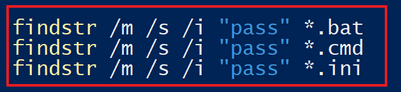
Here is some example. We will serach for a word andrzej insite a PowerShell script
First with /m argument to find only the file name
findstr /m /s /i "andrzej" *.ps1
and here inside the script without /m
findstr /s /i "andrzej" *.ps1
That’s it, thank for reading
Andrzej
 Home
Home 