
A quick post about Azure RBAC and Role Definition.
- What I can do with RBAC?
- Allow for particular user to manage Virtual Machines or for another user to manage Storage
- Allow for Database Admins to manage SQL Managed Instance in a subscription
- Allow for a user to manage all resources in a Resource Group like Storage, Network or Databases
- Allow an application to access all resources in a resource group
2. For whom can I assign a role?
A RBAC can be assign for any Security Principal like:
- user (An individual who has a profile in Azure Active Directory)
- groups (A set of users created in Azure Active Directory)
- service principal (A security identity used by applications or services to access specific Azure resources)
- managed identity (An identity in Azure Active Directory that is automatically managed by Azure)
3. Do I have predefined Role in Azure?
Azure includes several built-in role that we can use, but also we can create our own role if we needed. Azure have four fundameltal (general) built-in role, that are listed below:
Owner – has full access to ALL resources. This role has also the right to delegate access to others.
Contributor – can create, delete and manage all types of Azure resources, but can’t delegete it to others.
Reader – can only view existing Azure resource.
The rest of built-in roles are specified to particular resource like Database, Storage or Networking. For example SQL Server Contributor lets you manage SQL servers and databases.
3. Which scope level exist in Azure?
When you grant access at a parent scope, those permissions are inherited to the child scopes
A Role Based Access Control can be assign to different scope. For example, if I want to grant user access only to one Virutal Machine I can do this at the Resource level, or if I want to grant user access t manage all VM’s in a subscription I can assign the role at the Subscription level.
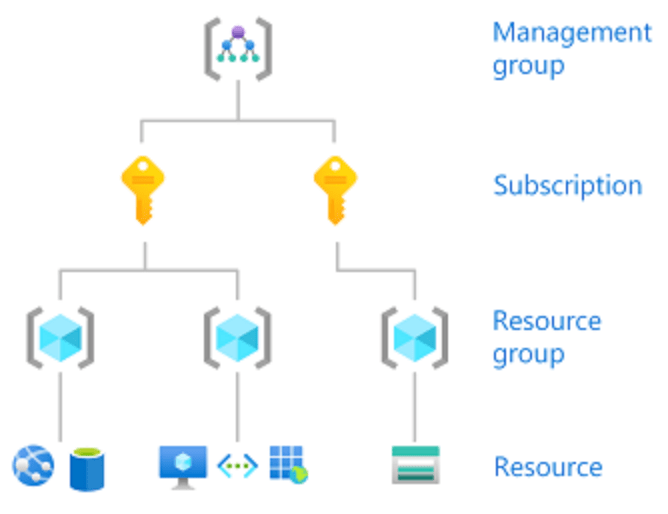
Access is granted by creating a role assignment, and access is revoked by removing a role assignment.
Manage Role Based Access Control – Summary
- Create a custom role or use existing buil-in role
- Provide access to Azure resources by assigning roles to:
- Management Group
- Subscription
- Resource Group
- Resource
3. Interpret access assignments
This is a short overview about RBAC in Azure, all this information can be found on Microsoft webpage.
 Home
Home 